{
    "id": "9a11045f-f9eb-4d25-bc82-1625b4399fdd",
    "name": "Exploring Multicast with PIM Sparse-Mode",
    "slug": "exploring-multicast-with-pim-sparse-mode",
    "status": "published",
    "lab_type": "pta",
    "is_sample": false,
    "duration_in_seconds": 1800,
    "metadata": {
        "courses": [
            "e2a1e73c-a8e0-4726-8b4f-eb120ea22acf"
        ],
        "pta_sdn": "1981",
        "collections": [],
        "pta_manual_id": "8e71-bae8-164f-5a5b",
        "pta_namespace": "my.ine",
        "learning_paths": [],
        "has_published_parent": true
    },
    "session": null,
    "company": "a491bc32-c056-4946-9169-cc053387bada",
    "created": "2026-03-04T17:09:36.963324Z",
    "modified": "2026-03-31T18:25:48.832988Z",
    "is_beta": false,
    "lab_objectives": [],
    "main_learning_area": "e73fd5a8-2ead-4159-9a25-38b50ad4ab20",
    "learning_areas": [
        {
            "id": "e73fd5a8-2ead-4159-9a25-38b50ad4ab20",
            "name": "Networking",
            "slug": "networking"
        }
    ],
    "categories": [],
    "tags": [],
    "difficulty": "professional",
    "is_web_access": false,
    "is_lab_experience": false,
    "is_featured": false,
    "cve": null,
    "severity": null,
    "year": null,
    "classification": null,
    "is_trackable": false,
    "cpe_credits": null,
    "is_skill_check": false,
    "external_url": "",
    "solution_video": null,
    "explanation_video": null,
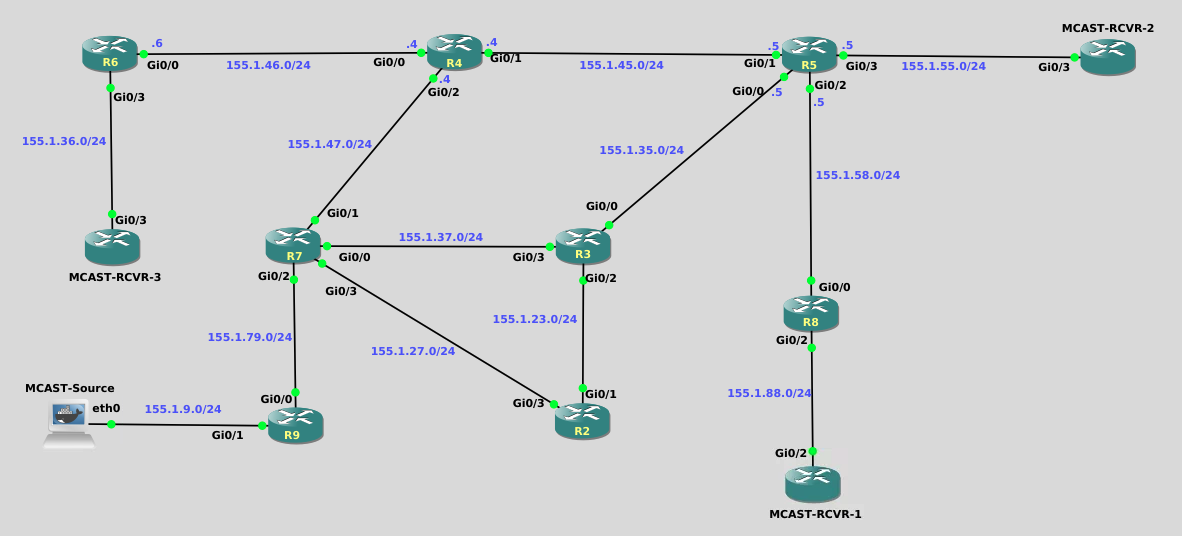
    "description": "![image6](https://assets.ine.com/lab/learningpath/29fa64be78beb17b93c1f00087690beb0bf937959c76a724548b07c05d55f195.png)\n\nExploring Multicast with PIM Sparse-Mode is a hands-on lab designed to help learners build an intuitive, visual understanding of how multicast forwarding works in a PIM Sparse-Mode network. Through a sequence of guided predictions, configurations, and packet captures, learners observe how receiver interest (via IGMP) triggers the creation of shared (*,G) trees toward the Rendezvous Point, and how the introduction of an active source later drives the formation of source-specific (S,G) trees. By inspecting PIM Join/Prune messages, multicast routing tables, and state changes over time, the lab\u2019s objective is to move beyond rote configuration and help learners clearly understand why PIM Sparse-Mode behaves the way it does\u2014how control-plane signaling precedes traffic, how the RP fits into the process, and how multicast state is created, used, and eventually removed.",
    "description_html": "<p><img alt=\"image6\" src=\"https://assets.ine.com/lab/learningpath/29fa64be78beb17b93c1f00087690beb0bf937959c76a724548b07c05d55f195.png\" /></p>\n<p>Exploring Multicast with PIM Sparse-Mode is a hands-on lab designed to help learners build an intuitive, visual understanding of how multicast forwarding works in a PIM Sparse-Mode network. Through a sequence of guided predictions, configurations, and packet captures, learners observe how receiver interest (via IGMP) triggers the creation of shared (*,G) trees toward the Rendezvous Point, and how the introduction of an active source later drives the formation of source-specific (S,G) trees. By inspecting PIM Join/Prune messages, multicast routing tables, and state changes over time, the lab\u2019s objective is to move beyond rote configuration and help learners clearly understand why PIM Sparse-Mode behaves the way it does\u2014how control-plane signaling precedes traffic, how the RP fits into the process, and how multicast state is created, used, and eventually removed.</p>",
    "tasks": "![image6](https://assets.ine.com/lab/learningpath/29fa64be78beb17b93c1f00087690beb0bf937959c76a724548b07c05d55f195.png)\n\n# Lab Tasks \u2014 Exploring PIM Sparse-Mode\n\n## Scope and intent\nIn this lab you\u2019ll bring **PIM Sparse-Mode** to life and *watch* it form trees in response to receivers and sources.\n\nUnicast reachability (EIGRP) and IP addressing are already working. Your job is multicast only.\n\n**Goal:** send a multicast ping from **Host9** to **225.9.9.9** and confirm the three receivers (Mcast-Rcvr-1/2/3) successfully receive the flow, while you understand *why* the network builds **(*,G)** first and **(S,G)** later.\n\n---\n\n## Topology quick map (only what you\u2019ll touch)\n- **RP:** R3 (Loopback0 = 3.3.3.3)\n- **Source LAN:** Host9 \u2194 R9 Gi0/1\n- **Receiver LANs:**\n  - Mcast-Rcvr-1 \u2194 R8 Gi0/2\n  - Mcast-Rcvr-2 \u2194 R5 Gi0/3\n  - Mcast-Rcvr-3 \u2194 R6 Gi0/3\n- **Core links (for PIM adjacency and forwarding):**\n  - R9\u2013R7, R7\u2013R3, R7\u2013R4, R7\u2013R2, R3\u2013R2, R3\u2013R5, R5\u2013R4, R4\u2013R6, R5\u2013R8\n\n> The \u201cMcast-Rcvr\u201d nodes are IOSv routers in GNS3, but in this lab they behave like **hosts** (IGMP only).\n\n---\n\n## Task 1 \u2014 Get oriented (no changes yet)\n1. Confirm unicast reachability between key nodes:\n   - From R9, ping R3\u2019s loopback (3.3.3.3).\n   - From R8/R5/R6, ping 3.3.3.3.\n2. On any router, run:\n   - `show ip mroute`\n\n**Before moving on \u2014 answer/predict:**\n- Did you expect to see any multicast routing state right now? Why?\n\n---\n\n## Task 2 \u2014 Turn on multicast routing + PIM Sparse-Mode\nNow you\u2019ll \u201cswitch on\u201d the multicast control-plane.\n\n1. On every router that will participate in multicast forwarding (R2\u2013R9), enable multicast routing globally.\n2. On the routed interfaces that carry multicast, enable **PIM Sparse-Mode**.\n3. Configure **R3 as the static RP** for the domain.\n\n**Before you verify \u2014 answer/predict:**\n- With PIM enabled but *no receivers* and *no source traffic*, do you expect any `show ip mroute` entries? Why?\n- What do you expect to see change first: the multicast routing table, or PIM neighbor relationships?\n\nThen verify:\n- PIM neighbors exist where expected (`show ip pim neighbor`).\n- The RP mapping is known (`show ip pim rp mapping`).\n- R3 is reachable via unicast (`ping 3.3.3.3`).\n\n---\n\n## Task 3 \u2014 First receiver joins + IGMP packet capture (Mcast-Rcvr-1 only)\nIn this task you will capture an IGMP message on the receiver LAN.\n\n### Step 1 \u2014 Start capture (GNS3 \u2192 Wireshark)\n1. In GNS3, **right\u2011click the link between Mcast\u2011Rcvr\u20111 and R8**.\n2. Choose **Start Capture**. Wireshark should open.\n\n### Step 2 \u2014 Join the group\n3. On **Mcast\u2011Rcvr\u20111**, on the upstream interface (Gi0/2), join group 225.9.9.9:\n   ```text\n   interface gi0/2\n    ip igmp join-group 225.9.9.9\n   ```\n\n### Step 3 \u2014 Inspect the IGMP packet in Wireshark\nFind the IGMP packet that was captured and answer:\n\n1. **Which IGMP version** is it?\n2. Is it a **Membership Report**, a **Query**, or a **Leave**?\n3. What is the **Group Address** field set to?\n4. What is the **destination IP** of the IGMP packet? (Unicast? Multicast? Which one?)\n\n> Take a screenshot or jot down the answers \u2014 you\u2019ll use them later.\n\n### Step 4 \u2014 Stop capture\n4. Quit Wireshark.\n5. In GNS3, right\u2011click the same link and select **Stop Capture**.\n\n### Step 5 \u2014 Confirm local multicast state\n6. On **R8**, run:\n   - `show ip igmp groups`\n   - `show ip mroute 225.9.9.9`\n\n**Before moving on \u2014 answer/predict:**\n- Do you expect to see **(*,225.9.9.9)** state now?\n- Do you expect to see **(S,225.9.9.9)** state now? Why/why not?\n\n---\n\n## Task 4 \u2014 Watch a PIM Join reach the RP (capture on R6\u2013R4)\nNow you\u2019ll capture a PIM Join/Prune message on the core link into the RP.\n\n### Step 1 \u2014 Start capture (R6\u2013R4 link)\n1. In GNS3, right\u2011click the **link between R6 and R4** and choose **Start Capture**.\n\n### Step 2 \u2014 Have Mcast\u2011Rcvr\u20113 join\n2. On **Mcast\u2011Rcvr\u20113**, on the upstream interface (Gi0/3), join group 225.9.9.9:\n   ```text\n   interface gi0/3\n    ip igmp join-group 225.9.9.9\n   ```\n\n### Step 3 \u2014 Inspect the PIM Join in Wireshark\nIn Wireshark, find the packet sent from **R6 \u2192 R4** and confirm it is a **PIM Join/Prune**.\n\nAnswer:\n\n1. Is it a **(*,G)** join or an **(S,G)** join?\n2. What is the **Group Address**?\n3. Identify **at least three fields** from the Join/Prune message. (Examples: Upstream Neighbor Address, Holdtime, Group Count, Joined Source address/flags.)\n\n**Before moving on \u2014 answer/predict:**\n- Why is this join being sent **toward R3 (the RP)** instead of toward the source?\n\n### Step 4 \u2014 Stop capture\n4. Quit Wireshark.\n5. Right\u2011click the R6\u2013R4 link again and select **Stop Capture**.\n\n---\n\n## Task 5 \u2014 Bring in the final receiver (Mcast\u2011Rcvr\u20112)\nNow repeat the join action (no capture needed this time).\n\n1. On **Mcast\u2011Rcvr\u20112**, on the upstream interface (Gi0/3), join group 225.9.9.9:\n   ```text\n   interface gi0/3\n    ip igmp join-group 225.9.9.9\n   ```\n\nVerify on upstream routers (R5, and R3):\n- `show ip mroute 225.9.9.9`\n\n**Before moving on \u2014 answer/predict:**\n- You now have receivers, but still no traffic. Why should **(*,G)** exist anyway?\n\n---\n\n## Task 6 \u2014 Introduce the multicast source\nTime to actually create multicast traffic.\n\n1. From the command line of the Mcast-Src node ensure it has an existing IPv4 address on its eth0 interface using the command, **ifconfig** and that it has a default route to 155.1.36.6 using the command **route**\n\n    ![image9](https://assets.ine.com/lab/learningpath/f7f5ade50793ce2cac78566b480f34e741be4c8c52c0679a0e745f530e0f6265.png)\n\n2. If you don't see either the IPv4 address or the default route add the following commands to that mcast-source node:\n\n    ```\n    ip link set eth0 up\n    ip addr add 155.1.36.66/24 dev eth0\n    ip route add default via 155.1.36.6 dev eth0\n    ip route add 224.0.0.0/4 dev eth0\n    ip link set eth0 multicast on\n    ```\n\n\n3. From the **MCAST-Src**, send multicast traffic by using the command below in the command line of that node:\n\n    ```\n    while true; do\n    echo \"udp test\" | socat - UDP4-DATAGRAM:225.9.9.9:9999,ip-multicast-ttl=16\n    sleep 0.25\n    done\n    ```\n\n\n4. The commands you just implemented will send a steady stream of multicast packets that will not stop until you issue the \"Ctrl-C\" command on that node.\n\n**Before you look \u2014 answer/predict:**\n- Where do you expect to see **(S,225.9.9.9)** state appear first?\n- Do you think the RP will still be involved after traffic starts?\n\nThen verify on multiple routers:\n- `show ip mroute 225.9.9.9`\n- `show ip pim rp mapping`\n- Optionally: `debug ip pim` (use carefully)\n\n---\n\n## Task 7 \u2014 Compare (*,G) vs (S,G) like a detective\nWith traffic flowing, compare entries on:\n- R9 (near source), R3 (RP), and one router near a receiver (R8/R5/R6)\n\nAnswer:\n1. Which entries are **(*,G)** and which are **(S,G)**?\n2. What event(s) clearly triggered:\n   - the creation of **(*,G)**?\n   - the creation of **(S,G)**?\n3. Which entry appears to be responsible for forwarding the actual multicast packets?\n\n---\n\n## Task 8 \u2014 Wrap-up: stop traffic and watch state decay\n1. Stop the multicast traffic from the MCAST-Host node (Ctrl-C).\n2. Observe how the mroute state changes over time in routers directly connected to the Mcast-Receiver nodes with `show ip mroute 225.9.9.9`.\n\nAnswer:\n- Which state disappears first: (*,G) or (S,G)?\n- Why does that make sense?\n\n---\n\n**End of Lab Tasks**",
    "tasks_html": "<p><img alt=\"image6\" src=\"https://assets.ine.com/lab/learningpath/29fa64be78beb17b93c1f00087690beb0bf937959c76a724548b07c05d55f195.png\" /></p>\n<h1>Lab Tasks \u2014 Exploring PIM Sparse-Mode</h1>\n<h2>Scope and intent</h2>\n<p>In this lab you\u2019ll bring <strong>PIM Sparse-Mode</strong> to life and <em>watch</em> it form trees in response to receivers and sources.</p>\n<p>Unicast reachability (EIGRP) and IP addressing are already working. Your job is multicast only.</p>\n<p><strong>Goal:</strong> send a multicast ping from <strong>Host9</strong> to <strong>225.9.9.9</strong> and confirm the three receivers (Mcast-Rcvr-1/2/3) successfully receive the flow, while you understand <em>why</em> the network builds <strong>(*,G)</strong> first and <strong>(S,G)</strong> later.</p>\n<hr />\n<h2>Topology quick map (only what you\u2019ll touch)</h2>\n<ul>\n<li><strong>RP:</strong> R3 (Loopback0 = 3.3.3.3)</li>\n<li><strong>Source LAN:</strong> Host9 \u2194 R9 Gi0/1</li>\n<li><strong>Receiver LANs:</strong><ul>\n<li>Mcast-Rcvr-1 \u2194 R8 Gi0/2</li>\n<li>Mcast-Rcvr-2 \u2194 R5 Gi0/3</li>\n<li>Mcast-Rcvr-3 \u2194 R6 Gi0/3</li>\n</ul>\n</li>\n<li><strong>Core links (for PIM adjacency and forwarding):</strong><ul>\n<li>R9\u2013R7, R7\u2013R3, R7\u2013R4, R7\u2013R2, R3\u2013R2, R3\u2013R5, R5\u2013R4, R4\u2013R6, R5\u2013R8</li>\n</ul>\n</li>\n</ul>\n<blockquote>\n<p>The \u201cMcast-Rcvr\u201d nodes are IOSv routers in GNS3, but in this lab they behave like <strong>hosts</strong> (IGMP only).</p>\n</blockquote>\n<hr />\n<h2>Task 1 \u2014 Get oriented (no changes yet)</h2>\n<ol>\n<li>Confirm unicast reachability between key nodes:</li>\n<li>From R9, ping R3\u2019s loopback (3.3.3.3).</li>\n<li>From R8/R5/R6, ping 3.3.3.3.</li>\n<li>On any router, run:</li>\n<li><code>show ip mroute</code></li>\n</ol>\n<p><strong>Before moving on \u2014 answer/predict:</strong>\n- Did you expect to see any multicast routing state right now? Why?</p>\n<hr />\n<h2>Task 2 \u2014 Turn on multicast routing + PIM Sparse-Mode</h2>\n<p>Now you\u2019ll \u201cswitch on\u201d the multicast control-plane.</p>\n<ol>\n<li>On every router that will participate in multicast forwarding (R2\u2013R9), enable multicast routing globally.</li>\n<li>On the routed interfaces that carry multicast, enable <strong>PIM Sparse-Mode</strong>.</li>\n<li>Configure <strong>R3 as the static RP</strong> for the domain.</li>\n</ol>\n<p><strong>Before you verify \u2014 answer/predict:</strong>\n- With PIM enabled but <em>no receivers</em> and <em>no source traffic</em>, do you expect any <code>show ip mroute</code> entries? Why?\n- What do you expect to see change first: the multicast routing table, or PIM neighbor relationships?</p>\n<p>Then verify:\n- PIM neighbors exist where expected (<code>show ip pim neighbor</code>).\n- The RP mapping is known (<code>show ip pim rp mapping</code>).\n- R3 is reachable via unicast (<code>ping 3.3.3.3</code>).</p>\n<hr />\n<h2>Task 3 \u2014 First receiver joins + IGMP packet capture (Mcast-Rcvr-1 only)</h2>\n<p>In this task you will capture an IGMP message on the receiver LAN.</p>\n<h3>Step 1 \u2014 Start capture (GNS3 \u2192 Wireshark)</h3>\n<ol>\n<li>In GNS3, <strong>right\u2011click the link between Mcast\u2011Rcvr\u20111 and R8</strong>.</li>\n<li>Choose <strong>Start Capture</strong>. Wireshark should open.</li>\n</ol>\n<h3>Step 2 \u2014 Join the group</h3>\n<ol>\n<li>On <strong>Mcast\u2011Rcvr\u20111</strong>, on the upstream interface (Gi0/2), join group 225.9.9.9:\n   <pre class=\"codehilite\"><code class=\"language-text\">interface gi0/2\n ip igmp join-group 225.9.9.9</code></pre></li>\n</ol>\n<h3>Step 3 \u2014 Inspect the IGMP packet in Wireshark</h3>\n<p>Find the IGMP packet that was captured and answer:</p>\n<ol>\n<li><strong>Which IGMP version</strong> is it?</li>\n<li>Is it a <strong>Membership Report</strong>, a <strong>Query</strong>, or a <strong>Leave</strong>?</li>\n<li>What is the <strong>Group Address</strong> field set to?</li>\n<li>What is the <strong>destination IP</strong> of the IGMP packet? (Unicast? Multicast? Which one?)</li>\n</ol>\n<blockquote>\n<p>Take a screenshot or jot down the answers \u2014 you\u2019ll use them later.</p>\n</blockquote>\n<h3>Step 4 \u2014 Stop capture</h3>\n<ol>\n<li>Quit Wireshark.</li>\n<li>In GNS3, right\u2011click the same link and select <strong>Stop Capture</strong>.</li>\n</ol>\n<h3>Step 5 \u2014 Confirm local multicast state</h3>\n<ol>\n<li>On <strong>R8</strong>, run:</li>\n<li><code>show ip igmp groups</code></li>\n<li><code>show ip mroute 225.9.9.9</code></li>\n</ol>\n<p><strong>Before moving on \u2014 answer/predict:</strong>\n- Do you expect to see <strong>(*,225.9.9.9)</strong> state now?\n- Do you expect to see <strong>(S,225.9.9.9)</strong> state now? Why/why not?</p>\n<hr />\n<h2>Task 4 \u2014 Watch a PIM Join reach the RP (capture on R6\u2013R4)</h2>\n<p>Now you\u2019ll capture a PIM Join/Prune message on the core link into the RP.</p>\n<h3>Step 1 \u2014 Start capture (R6\u2013R4 link)</h3>\n<ol>\n<li>In GNS3, right\u2011click the <strong>link between R6 and R4</strong> and choose <strong>Start Capture</strong>.</li>\n</ol>\n<h3>Step 2 \u2014 Have Mcast\u2011Rcvr\u20113 join</h3>\n<ol>\n<li>On <strong>Mcast\u2011Rcvr\u20113</strong>, on the upstream interface (Gi0/3), join group 225.9.9.9:\n   <pre class=\"codehilite\"><code class=\"language-text\">interface gi0/3\n ip igmp join-group 225.9.9.9</code></pre></li>\n</ol>\n<h3>Step 3 \u2014 Inspect the PIM Join in Wireshark</h3>\n<p>In Wireshark, find the packet sent from <strong>R6 \u2192 R4</strong> and confirm it is a <strong>PIM Join/Prune</strong>.</p>\n<p>Answer:</p>\n<ol>\n<li>Is it a <strong>(*,G)</strong> join or an <strong>(S,G)</strong> join?</li>\n<li>What is the <strong>Group Address</strong>?</li>\n<li>Identify <strong>at least three fields</strong> from the Join/Prune message. (Examples: Upstream Neighbor Address, Holdtime, Group Count, Joined Source address/flags.)</li>\n</ol>\n<p><strong>Before moving on \u2014 answer/predict:</strong>\n- Why is this join being sent <strong>toward R3 (the RP)</strong> instead of toward the source?</p>\n<h3>Step 4 \u2014 Stop capture</h3>\n<ol>\n<li>Quit Wireshark.</li>\n<li>Right\u2011click the R6\u2013R4 link again and select <strong>Stop Capture</strong>.</li>\n</ol>\n<hr />\n<h2>Task 5 \u2014 Bring in the final receiver (Mcast\u2011Rcvr\u20112)</h2>\n<p>Now repeat the join action (no capture needed this time).</p>\n<ol>\n<li>On <strong>Mcast\u2011Rcvr\u20112</strong>, on the upstream interface (Gi0/3), join group 225.9.9.9:\n   <pre class=\"codehilite\"><code class=\"language-text\">interface gi0/3\n ip igmp join-group 225.9.9.9</code></pre></li>\n</ol>\n<p>Verify on upstream routers (R5, and R3):\n- <code>show ip mroute 225.9.9.9</code></p>\n<p><strong>Before moving on \u2014 answer/predict:</strong>\n- You now have receivers, but still no traffic. Why should <strong>(*,G)</strong> exist anyway?</p>\n<hr />\n<h2>Task 6 \u2014 Introduce the multicast source</h2>\n<p>Time to actually create multicast traffic.</p>\n<ol>\n<li>\n<p>From the command line of the Mcast-Src node ensure it has an existing IPv4 address on its eth0 interface using the command, <strong>ifconfig</strong> and that it has a default route to 155.1.36.6 using the command <strong>route</strong></p>\n<p><img alt=\"image9\" src=\"https://assets.ine.com/lab/learningpath/f7f5ade50793ce2cac78566b480f34e741be4c8c52c0679a0e745f530e0f6265.png\" /></p>\n</li>\n<li>\n<p>If you don't see either the IPv4 address or the default route add the following commands to that mcast-source node:</p>\n<pre class=\"codehilite\"><code>ip link set eth0 up\nip addr add 155.1.36.66/24 dev eth0\nip route add default via 155.1.36.6 dev eth0\nip route add 224.0.0.0/4 dev eth0\nip link set eth0 multicast on</code></pre>\n\n</li>\n<li>\n<p>From the <strong>MCAST-Src</strong>, send multicast traffic by using the command below in the command line of that node:</p>\n<pre class=\"codehilite\"><code>while true; do\necho \"udp test\" | socat - UDP4-DATAGRAM:225.9.9.9:9999,ip-multicast-ttl=16\nsleep 0.25\ndone</code></pre>\n\n</li>\n<li>\n<p>The commands you just implemented will send a steady stream of multicast packets that will not stop until you issue the \"Ctrl-C\" command on that node.</p>\n</li>\n</ol>\n<p><strong>Before you look \u2014 answer/predict:</strong>\n- Where do you expect to see <strong>(S,225.9.9.9)</strong> state appear first?\n- Do you think the RP will still be involved after traffic starts?</p>\n<p>Then verify on multiple routers:\n- <code>show ip mroute 225.9.9.9</code>\n- <code>show ip pim rp mapping</code>\n- Optionally: <code>debug ip pim</code> (use carefully)</p>\n<hr />\n<h2>Task 7 \u2014 Compare (*,G) vs (S,G) like a detective</h2>\n<p>With traffic flowing, compare entries on:\n- R9 (near source), R3 (RP), and one router near a receiver (R8/R5/R6)</p>\n<p>Answer:\n1. Which entries are <strong>(*,G)</strong> and which are <strong>(S,G)</strong>?\n2. What event(s) clearly triggered:\n   - the creation of <strong>(*,G)</strong>?\n   - the creation of <strong>(S,G)</strong>?\n3. Which entry appears to be responsible for forwarding the actual multicast packets?</p>\n<hr />\n<h2>Task 8 \u2014 Wrap-up: stop traffic and watch state decay</h2>\n<ol>\n<li>Stop the multicast traffic from the MCAST-Host node (Ctrl-C).</li>\n<li>Observe how the mroute state changes over time in routers directly connected to the Mcast-Receiver nodes with <code>show ip mroute 225.9.9.9</code>.</li>\n</ol>\n<p>Answer:\n- Which state disappears first: (*,G) or (S,G)?\n- Why does that make sense?</p>\n<hr />\n<p><strong>End of Lab Tasks</strong></p>",
    "published_date": "2026-03-31T18:25:48.826075Z",
    "solutions": "![image6](https://assets.ine.com/lab/learningpath/29fa64be78beb17b93c1f00087690beb0bf937959c76a724548b07c05d55f195.png)\n\n# Lab Solutions \u2014 Exploring PIM Sparse-Mode (Guided Debrief)\n\nThis document walks back through the lab in the **same order as the tasks**, answering every prediction question along the way.  \nIt also explains a few *Cisco IOS behaviors* that can otherwise be surprising the first time you notice them.\n\n---\n\n## General Solution Configs\n\n```\nR2 through R9\n\nip multicast-routing\n!\ninterface range gigabit0/0 - 3\n ip pim sparse-mode\n exit\n!\nip pim rp-address 3.3.3.3\n\n```\n\n```\nMulticast Receivers\n\nMCAST-RCVR-1\n\ninterface gig0/2\n ip igmp join-group 225.9.9.9\n end\n\nMCAST-RCVR-2 & MCAST-RCVR-3\n\ninterface gig0/3\n ip igmp join-group 225.9.9.9\n end\n\n```\nMore detailed explanations are below.\n---\n\n## Before We Begin \u2014 Two Ground Rules (Very Important)\n\n### 1\ufe0f\u20e3 Multicast routing must be enabled first\nBefore PIM can function, **IP multicast routing must be enabled globally**.\n\nThis is required on **every router that will forward multicast traffic**:\n\n- R2, R3, R4, R5, R6, R7, R8, R9\n\nIt is **not required** on the receiver routers (Mcast-Rcvr-1/2/3).\n\n```text\nconf t\n ip multicast-routing\nend\n```\n\n---\n\n### 2\ufe0f\u20e3 Static RP really does mean *static*\nBecause this lab uses a **static Rendezvous Point**, *every router that participates in PIM Sparse-Mode must be told who the RP is*.\n\n```text\nconf t\n ip pim rp-address 3.3.3.3\nend\n```\n\nR3 owns that address on Loopback0, but that alone does **not** advertise RP information.\n\n---\n\n### 3\ufe0f\u20e3 Receiver routers are acting like hosts\nEven though **Mcast-Rcvr-1 / 2 / 3** are IOSv routers, in this lab they behave like multicast **hosts**:\n\n- They do **not** run PIM\n- They do **not** run multicast routing\n- They only use **IGMP**\n\n```text\ninterface <upstream-interface>\n ip igmp join-group 225.9.9.9\n```\n\n---\n\n## Task 1 \u2014 Getting Oriented\n\n**Question:**  \nDo you expect any multicast routing entries to exist yet? Why?\n\n**Answer:**  \nNot for your *lab group*, but you may already see **one multicast entry**.\n\nWhen `ip multicast-routing` is enabled, Cisco IOS automatically creates multicast state for certain **well-known control groups**, even before any receivers join.\n\nThis is normal.\n\n---\n\n## Task 2 \u2014 Enabling PIM Sparse-Mode\n\n### Required interface configuration\n\nAfter multicast routing is enabled, PIM Sparse-Mode must be enabled **per interface**:\n\n```text\nconf t\n interface gi0/0\n  ip pim sparse-mode\n !\n interface gi0/1\n  ip pim sparse-mode\nend\n```\n\nThis is required on:\n- Router-to-router links\n- Source-facing interfaces\n- Receiver-facing interfaces on upstream routers\n\nIt is **not** required on Mcast-Rcvr-1/2/3.\n\n---\n\n### Important clarification \u2014 why you already see a (*,G) entry\n\nAfter enabling multicast routing, you likely observed something similar to:\n\n```\n(*, 224.0.1.40), RP 3.3.3.3\n```\n\n**This entry is not caused by a receiver joining your lab group.**\n\n224.0.1.40 is a **well-known multicast control group** used internally by PIM and other protocols.\n\nIOS installs this (*,G) entry automatically so the router can:\n\n- Receive PIM control messages\n- Maintain RP reachability\n- Support multicast infrastructure signaling\n\n![image3](https://assets.ine.com/lab/learningpath/e5c9bb734efb0b2da1588446319b8bd06bce64d7c9da845edda5afee19afe46b.png)  This entry exists **even with zero receivers** and **no user multicast traffic**.\n\n---\n\n### Question (revisited):\nWhat event causes the first (*,G) entry for *your multicast group* (225.9.9.9) to appear?\n\n### Correct answer:\nThe **first IGMP Membership Report** for **225.9.9.9**.\n\nControl-plane groups (like 224.0.1.40) appear automatically,  \nbut **user multicast groups** only appear when a receiver explicitly joins.\n\nThis distinction is important and intentional.\n\n---\n\n## Task 3 \u2014 First Receiver Joins (Mcast-Rcvr-1)\n\n### What you saw in Wireshark\n\n- **IGMP version:** IGMPv2  \n- **Message type:** Membership Report  \n- **Group address:** 225.9.9.9  \n- **Destination IP:** 224.0.0.22  \n\nThat single packet is enough to trigger multicast routing state for the group.\n\n![image1](https://assets.ine.com/lab/learningpath/65bae0bf4c83aadc3d1cc2d3fc226357fc5819540b8d8546ba9e53ba41e331f5.png)\n\n---\n\n### Why (*,G) propagated to the RP\n\nSequence:\n\n1. R8 receives the IGMP Membership Report\n2. R8 creates:\n   ```\n   (*,225.9.9.9)\n   ```\n3. R8 sends a **PIM (*,G) Join** upstream\n4. The Join propagates:\n   ```\n   R8 \u2192 R5 \u2192 R3 (RP)\n   ```\n\nOne receiver builds the **entire shared tree**.\n\n  ![image7](https://assets.ine.com/lab/learningpath/5a47bd02ccda4ad33bae6ab6a3dd6453bd5f884a5b72fefb3c41136fdf71bb78.png)\n\n---\n\n### Why additional receivers on the same path don\u2019t trigger Joins\n\nBecause the tree already exists.\n\nPIM Joins extend trees \u2014 they do not count receivers.\n\n---\n\n## Task 4 \u2014 Watching a NEW PIM Join (Mcast-Rcvr-3)\n\nWhen Mcast-Rcvr-3 joins:\n\n1. R6 receives an IGMP Membership Report\n2. R6 has no (*,G) state yet\n3. R6 creates (*,G)\n4. R6 sends a **new PIM (*,G) Join** upstream\n\nPath:\n\n```text\nR6 \u2192 R4 \u2192 R7 \u2192 R3\n```\n\n### Wireshark observations\n\n- **Protocol:** PIMv2 Join/Prune\n- **Join type:** (*,G)\n- **Group:** 225.9.9.9\n- **Holdtime:** 210 seconds\n\n![image2](https://assets.ine.com/lab/learningpath/9c9c12f9c00a0acab7a666262456088ffc6e561bf54414784cb7e938db532697.png)\n\n---\n\n### Why the Join goes toward the RP\n\nNo source traffic exists yet.\n\nSparse-Mode always builds the **shared tree first**, rooted at the RP.\n\n---\n\n## Task 5 \u2014 Final Receiver (Mcast-Rcvr-2)\n\n**Why no new Join appears:**\n\n- R5 already has (*,G) state\n- The shared tree already exists on that path\n- No new branch is required\n\n![image8](https://assets.ine.com/lab/learningpath/527484eb59b388acd9617900020b3bf07c659d919a3eadc584b6a79a6b50ec54.png)\n---\n\n## Task 6 \u2014 Introducing the Multicast Source\n\nAfter adding the CLI commands to the MCAST-Source node and beginning the multicast stream, the sequence that you should have seen:\n\n1. R9 sends **PIM Registers** to R3\n2. R3 learns the source\n3. Routers build **(S,225.9.9.9)** state\n4. Traffic moves to the **Shortest Path Tree (SPT)**\n\n![image10](https://assets.ine.com/lab/learningpath/ac27dbff44d1ec38275f2b65bb5de87c05a684d7f665f039f89532854dc75f54.png)\n\n---\n\n### Where does (S,G) appear first?\nClosest to the source \u2014 starting at **R9**.\n\n![image11](https://assets.ine.com/lab/learningpath/de8ed643323120acc3823907357927cc71c12079ae11991d84d3b82490bae3d1.png)\n\n### How does the RP\u2019s role change?\nIt introduces the source, then data traffic typically bypasses it.\n\n---\n\n## Task 7 \u2014 (*,G) vs (S,G)\n\n- **(*,G):** receiver-driven, RP-rooted\n- **(S,G):** traffic-driven, source-rooted\n- **Forwarding:** typically occurs on (S,G)\n\n---\n\n## Task 8 \u2014 State Aging\n\nWhen traffic stops:\n\n- **(S,G)** ages out first\n- **(*,G)** may persist while receivers remain joined\n\n---\n\n## Final Takeaway\n\nSome multicast state exists **because the control plane needs it**.  \nOther multicast state exists **because a receiver asked for it**.\n\nKnowing the difference prevents a *lot* of confusion \u2014 and now you\u2019ve seen both.\n\n---\n\n**End of Lab Solutions**",
    "solutions_html": "<p><img alt=\"image6\" src=\"https://assets.ine.com/lab/learningpath/29fa64be78beb17b93c1f00087690beb0bf937959c76a724548b07c05d55f195.png\" /></p>\n<h1>Lab Solutions \u2014 Exploring PIM Sparse-Mode (Guided Debrief)</h1>\n<p>This document walks back through the lab in the <strong>same order as the tasks</strong>, answering every prediction question along the way.<br />\nIt also explains a few <em>Cisco IOS behaviors</em> that can otherwise be surprising the first time you notice them.</p>\n<hr />\n<h2>General Solution Configs</h2>\n<pre class=\"codehilite\"><code>R2 through R9\n\nip multicast-routing\n!\ninterface range gigabit0/0 - 3\n ip pim sparse-mode\n exit\n!\nip pim rp-address 3.3.3.3\n</code></pre>\n\n<p><pre class=\"codehilite\"><code>Multicast Receivers\n\nMCAST-RCVR-1\n\ninterface gig0/2\n ip igmp join-group 225.9.9.9\n end\n\nMCAST-RCVR-2 &amp; MCAST-RCVR-3\n\ninterface gig0/3\n ip igmp join-group 225.9.9.9\n end\n</code></pre>\nMore detailed explanations are below.</p>\n<hr />\n<h2>Before We Begin \u2014 Two Ground Rules (Very Important)</h2>\n<h3>1\ufe0f\u20e3 Multicast routing must be enabled first</h3>\n<p>Before PIM can function, <strong>IP multicast routing must be enabled globally</strong>.</p>\n<p>This is required on <strong>every router that will forward multicast traffic</strong>:</p>\n<ul>\n<li>R2, R3, R4, R5, R6, R7, R8, R9</li>\n</ul>\n<p>It is <strong>not required</strong> on the receiver routers (Mcast-Rcvr-1/2/3).</p>\n<pre class=\"codehilite\"><code class=\"language-text\">conf t\n ip multicast-routing\nend</code></pre>\n\n<hr />\n<h3>2\ufe0f\u20e3 Static RP really does mean <em>static</em></h3>\n<p>Because this lab uses a <strong>static Rendezvous Point</strong>, <em>every router that participates in PIM Sparse-Mode must be told who the RP is</em>.</p>\n<pre class=\"codehilite\"><code class=\"language-text\">conf t\n ip pim rp-address 3.3.3.3\nend</code></pre>\n\n<p>R3 owns that address on Loopback0, but that alone does <strong>not</strong> advertise RP information.</p>\n<hr />\n<h3>3\ufe0f\u20e3 Receiver routers are acting like hosts</h3>\n<p>Even though <strong>Mcast-Rcvr-1 / 2 / 3</strong> are IOSv routers, in this lab they behave like multicast <strong>hosts</strong>:</p>\n<ul>\n<li>They do <strong>not</strong> run PIM</li>\n<li>They do <strong>not</strong> run multicast routing</li>\n<li>They only use <strong>IGMP</strong></li>\n</ul>\n<pre class=\"codehilite\"><code class=\"language-text\">interface &lt;upstream-interface&gt;\n ip igmp join-group 225.9.9.9</code></pre>\n\n<hr />\n<h2>Task 1 \u2014 Getting Oriented</h2>\n<p><strong>Question:</strong><br />\nDo you expect any multicast routing entries to exist yet? Why?</p>\n<p><strong>Answer:</strong><br />\nNot for your <em>lab group</em>, but you may already see <strong>one multicast entry</strong>.</p>\n<p>When <code>ip multicast-routing</code> is enabled, Cisco IOS automatically creates multicast state for certain <strong>well-known control groups</strong>, even before any receivers join.</p>\n<p>This is normal.</p>\n<hr />\n<h2>Task 2 \u2014 Enabling PIM Sparse-Mode</h2>\n<h3>Required interface configuration</h3>\n<p>After multicast routing is enabled, PIM Sparse-Mode must be enabled <strong>per interface</strong>:</p>\n<pre class=\"codehilite\"><code class=\"language-text\">conf t\n interface gi0/0\n  ip pim sparse-mode\n !\n interface gi0/1\n  ip pim sparse-mode\nend</code></pre>\n\n<p>This is required on:\n- Router-to-router links\n- Source-facing interfaces\n- Receiver-facing interfaces on upstream routers</p>\n<p>It is <strong>not</strong> required on Mcast-Rcvr-1/2/3.</p>\n<hr />\n<h3>Important clarification \u2014 why you already see a (*,G) entry</h3>\n<p>After enabling multicast routing, you likely observed something similar to:</p>\n<pre class=\"codehilite\"><code>(*, 224.0.1.40), RP 3.3.3.3</code></pre>\n\n<p><strong>This entry is not caused by a receiver joining your lab group.</strong></p>\n<p>224.0.1.40 is a <strong>well-known multicast control group</strong> used internally by PIM and other protocols.</p>\n<p>IOS installs this (*,G) entry automatically so the router can:</p>\n<ul>\n<li>Receive PIM control messages</li>\n<li>Maintain RP reachability</li>\n<li>Support multicast infrastructure signaling</li>\n</ul>\n<p><img alt=\"image3\" src=\"https://assets.ine.com/lab/learningpath/e5c9bb734efb0b2da1588446319b8bd06bce64d7c9da845edda5afee19afe46b.png\" />  This entry exists <strong>even with zero receivers</strong> and <strong>no user multicast traffic</strong>.</p>\n<hr />\n<h3>Question (revisited):</h3>\n<p>What event causes the first (<em>,G) entry for *your multicast group</em> (225.9.9.9) to appear?</p>\n<h3>Correct answer:</h3>\n<p>The <strong>first IGMP Membership Report</strong> for <strong>225.9.9.9</strong>.</p>\n<p>Control-plane groups (like 224.0.1.40) appear automatically,<br />\nbut <strong>user multicast groups</strong> only appear when a receiver explicitly joins.</p>\n<p>This distinction is important and intentional.</p>\n<hr />\n<h2>Task 3 \u2014 First Receiver Joins (Mcast-Rcvr-1)</h2>\n<h3>What you saw in Wireshark</h3>\n<ul>\n<li><strong>IGMP version:</strong> IGMPv2  </li>\n<li><strong>Message type:</strong> Membership Report  </li>\n<li><strong>Group address:</strong> 225.9.9.9  </li>\n<li><strong>Destination IP:</strong> 224.0.0.22  </li>\n</ul>\n<p>That single packet is enough to trigger multicast routing state for the group.</p>\n<p><img alt=\"image1\" src=\"https://assets.ine.com/lab/learningpath/65bae0bf4c83aadc3d1cc2d3fc226357fc5819540b8d8546ba9e53ba41e331f5.png\" /></p>\n<hr />\n<h3>Why (*,G) propagated to the RP</h3>\n<p>Sequence:</p>\n<ol>\n<li>R8 receives the IGMP Membership Report</li>\n<li>R8 creates:\n   <pre class=\"codehilite\"><code>(*,225.9.9.9)</code></pre></li>\n<li>R8 sends a <strong>PIM (*,G) Join</strong> upstream</li>\n<li>The Join propagates:\n   <pre class=\"codehilite\"><code>R8 \u2192 R5 \u2192 R3 (RP)</code></pre></li>\n</ol>\n<p>One receiver builds the <strong>entire shared tree</strong>.</p>\n<p><img alt=\"image7\" src=\"https://assets.ine.com/lab/learningpath/5a47bd02ccda4ad33bae6ab6a3dd6453bd5f884a5b72fefb3c41136fdf71bb78.png\" /></p>\n<hr />\n<h3>Why additional receivers on the same path don\u2019t trigger Joins</h3>\n<p>Because the tree already exists.</p>\n<p>PIM Joins extend trees \u2014 they do not count receivers.</p>\n<hr />\n<h2>Task 4 \u2014 Watching a NEW PIM Join (Mcast-Rcvr-3)</h2>\n<p>When Mcast-Rcvr-3 joins:</p>\n<ol>\n<li>R6 receives an IGMP Membership Report</li>\n<li>R6 has no (*,G) state yet</li>\n<li>R6 creates (*,G)</li>\n<li>R6 sends a <strong>new PIM (*,G) Join</strong> upstream</li>\n</ol>\n<p>Path:</p>\n<pre class=\"codehilite\"><code class=\"language-text\">R6 \u2192 R4 \u2192 R7 \u2192 R3</code></pre>\n\n<h3>Wireshark observations</h3>\n<ul>\n<li><strong>Protocol:</strong> PIMv2 Join/Prune</li>\n<li><strong>Join type:</strong> (*,G)</li>\n<li><strong>Group:</strong> 225.9.9.9</li>\n<li><strong>Holdtime:</strong> 210 seconds</li>\n</ul>\n<p><img alt=\"image2\" src=\"https://assets.ine.com/lab/learningpath/9c9c12f9c00a0acab7a666262456088ffc6e561bf54414784cb7e938db532697.png\" /></p>\n<hr />\n<h3>Why the Join goes toward the RP</h3>\n<p>No source traffic exists yet.</p>\n<p>Sparse-Mode always builds the <strong>shared tree first</strong>, rooted at the RP.</p>\n<hr />\n<h2>Task 5 \u2014 Final Receiver (Mcast-Rcvr-2)</h2>\n<p><strong>Why no new Join appears:</strong></p>\n<ul>\n<li>R5 already has (*,G) state</li>\n<li>The shared tree already exists on that path</li>\n<li>No new branch is required</li>\n</ul>\n<h2><img alt=\"image8\" src=\"https://assets.ine.com/lab/learningpath/527484eb59b388acd9617900020b3bf07c659d919a3eadc584b6a79a6b50ec54.png\" /></h2>\n<h2>Task 6 \u2014 Introducing the Multicast Source</h2>\n<p>After adding the CLI commands to the MCAST-Source node and beginning the multicast stream, the sequence that you should have seen:</p>\n<ol>\n<li>R9 sends <strong>PIM Registers</strong> to R3</li>\n<li>R3 learns the source</li>\n<li>Routers build <strong>(S,225.9.9.9)</strong> state</li>\n<li>Traffic moves to the <strong>Shortest Path Tree (SPT)</strong></li>\n</ol>\n<p><img alt=\"image10\" src=\"https://assets.ine.com/lab/learningpath/ac27dbff44d1ec38275f2b65bb5de87c05a684d7f665f039f89532854dc75f54.png\" /></p>\n<hr />\n<h3>Where does (S,G) appear first?</h3>\n<p>Closest to the source \u2014 starting at <strong>R9</strong>.</p>\n<p><img alt=\"image11\" src=\"https://assets.ine.com/lab/learningpath/de8ed643323120acc3823907357927cc71c12079ae11991d84d3b82490bae3d1.png\" /></p>\n<h3>How does the RP\u2019s role change?</h3>\n<p>It introduces the source, then data traffic typically bypasses it.</p>\n<hr />\n<h2>Task 7 \u2014 (*,G) vs (S,G)</h2>\n<ul>\n<li><strong>(*,G):</strong> receiver-driven, RP-rooted</li>\n<li><strong>(S,G):</strong> traffic-driven, source-rooted</li>\n<li><strong>Forwarding:</strong> typically occurs on (S,G)</li>\n</ul>\n<hr />\n<h2>Task 8 \u2014 State Aging</h2>\n<p>When traffic stops:</p>\n<ul>\n<li><strong>(S,G)</strong> ages out first</li>\n<li><strong>(*,G)</strong> may persist while receivers remain joined</li>\n</ul>\n<hr />\n<h2>Final Takeaway</h2>\n<p>Some multicast state exists <strong>because the control plane needs it</strong>.<br />\nOther multicast state exists <strong>because a receiver asked for it</strong>.</p>\n<p>Knowing the difference prevents a <em>lot</em> of confusion \u2014 and now you\u2019ve seen both.</p>\n<hr />\n<p><strong>End of Lab Solutions</strong></p>",
    "flags": [],
    "min_points_to_pass": null,
    "access_type": "default",
    "taxonomy_skills": [],
    "user_status": "unstarted",
    "user_lab_status": null,
    "user_status_modified": null,
    "user_flags": [],
    "global_running_session": null
}
