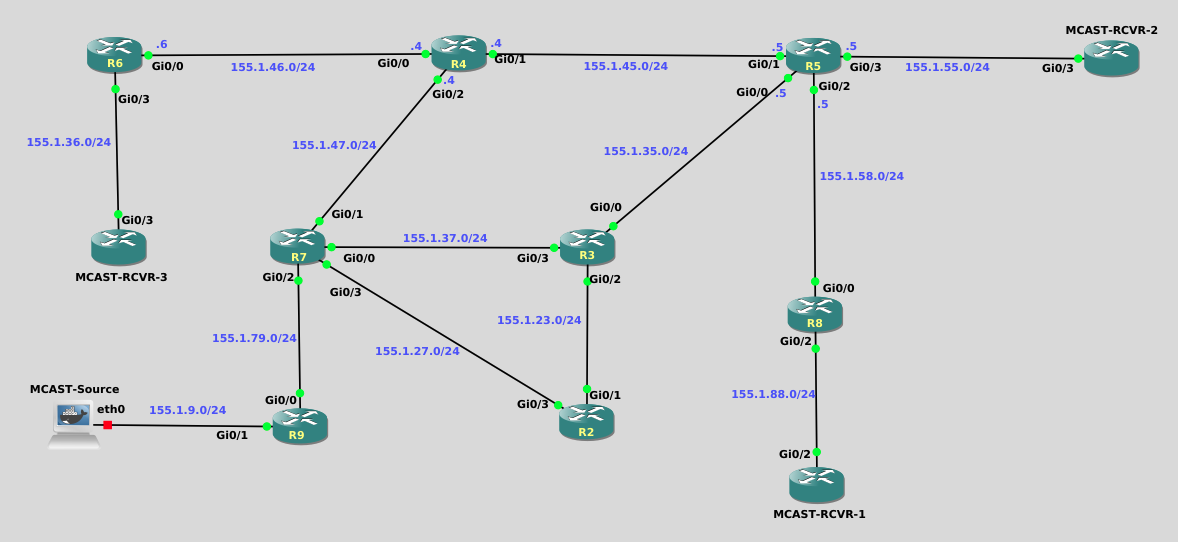
{
    "id": "d0d23f70-e670-4499-baec-0255a1a4678f",
    "name": "Dynamic Rendezvous Points with Auto-RP",
    "slug": "dynamic-rendezvous-points-with-auto-rp",
    "status": "published",
    "lab_type": "pta",
    "is_sample": false,
    "duration_in_seconds": 1800,
    "metadata": {
        "courses": [
            "e2a1e73c-a8e0-4726-8b4f-eb120ea22acf"
        ],
        "pta_sdn": "1981",
        "collections": [],
        "pta_manual_id": "e74d-2b04-745d-62b8",
        "pta_namespace": "my.ine",
        "learning_paths": [],
        "has_published_parent": true
    },
    "session": null,
    "company": "a491bc32-c056-4946-9169-cc053387bada",
    "created": "2026-03-04T17:07:37.733622Z",
    "modified": "2026-03-31T18:25:49.300510Z",
    "is_beta": false,
    "lab_objectives": [],
    "main_learning_area": "e73fd5a8-2ead-4159-9a25-38b50ad4ab20",
    "learning_areas": [
        {
            "id": "e73fd5a8-2ead-4159-9a25-38b50ad4ab20",
            "name": "Networking",
            "slug": "networking"
        }
    ],
    "categories": [],
    "tags": [],
    "difficulty": "professional",
    "is_web_access": false,
    "is_lab_experience": false,
    "is_featured": false,
    "cve": null,
    "severity": null,
    "year": null,
    "classification": null,
    "is_trackable": false,
    "cpe_credits": null,
    "is_skill_check": false,
    "external_url": "",
    "solution_video": null,
    "explanation_video": null,
    "description": "![image0](https://assets.ine.com/lab/learningpath/61b1d975398ba4a34d27215c5b2856e298595a0891b131788bfe35ed1b3bed30.png)\n\nWelcome to the Dynamic Rendezvous Points with Auto-RP lab, where you\u2019ll explore how PIM Sparse-Mode networks dynamically discover and use Rendezvous Points without relying on static configuration. In this hands-on lab, you\u2019ll step through the complete Auto-RP process\u2014preparing the network, configuring RP-Candidates and a Mapping Agent, and observing how RP information is advertised, discovered, and used across the topology. Along the way, you\u2019ll pause to predict behavior, verify control-plane operation, and even use Wireshark to watch Auto-RP messages on the wire, building an intuitive understanding of how modern IOS handles dynamic RP discovery.",
    "description_html": "<p><img alt=\"image0\" src=\"https://assets.ine.com/lab/learningpath/61b1d975398ba4a34d27215c5b2856e298595a0891b131788bfe35ed1b3bed30.png\" /></p>\n<p>Welcome to the Dynamic Rendezvous Points with Auto-RP lab, where you\u2019ll explore how PIM Sparse-Mode networks dynamically discover and use Rendezvous Points without relying on static configuration. In this hands-on lab, you\u2019ll step through the complete Auto-RP process\u2014preparing the network, configuring RP-Candidates and a Mapping Agent, and observing how RP information is advertised, discovered, and used across the topology. Along the way, you\u2019ll pause to predict behavior, verify control-plane operation, and even use Wireshark to watch Auto-RP messages on the wire, building an intuitive understanding of how modern IOS handles dynamic RP discovery.</p>",
    "tasks": "![image0](https://assets.ine.com/lab/learningpath/61b1d975398ba4a34d27215c5b2856e298595a0891b131788bfe35ed1b3bed30.png)\n\n# Lab Tasks \u2014 Exploring Auto-RP with PIM Sparse-Mode (with Packet Observation)\n\n## Lab Overview\n\nIn this lab, you\u2019ll explore **Auto-RP**, Cisco\u2019s dynamic mechanism for learning Rendezvous Points (RPs) in a PIM Sparse-Mode network.\n\nYou\u2019ll gradually introduce Auto-RP roles, **pause to predict behavior**, and use **Wireshark** at key moments to *see* the control-plane messages that make Auto-RP work.\n\nYou don\u2019t need to decode every field \u2014 focus on **who is talking**, **to whom**, and **why**.\n\n---\n\n## Task 1 \u2014 Take a Look Around (Baseline with No RP)\n\nLet\u2019s get comfortable with the current state of the network.\n\n1. Configure PIM on all appropriate router interfaces (R2 through R9). Do not configure any PIM on routers labeled as \"MCAST-RCVR\".\n\n2. On a few routers of your choice, verify:\n   - PIM neighbors are established\n   - Multicast routing is enabled\n\n3. On any router, verify whether an RP is currently known.\n\n---\n\n## Task 2 \u2014 How *Should* Auto-RP Work?\n\nBefore touching the configuration, let\u2019s think through Auto-RP itself.\n\n1. Auto-RP relies on two well-known multicast groups.\n\n   **Friendly Question:**  \n   Are these groups link-local, or are they routable across the network?  \n   What does that imply about how they must be forwarded?\n\n2. Auto-RP messages rely on **Dense-Mode flooding**.\n\n   **Prediction Time:**  \n   What PIM mode did you apply to your router interfaces (R2 through R9)? \n   Do you expect Auto-RP messages to propagate successfully in this mode?\n\n\nKeep your answer in mind \u2014 you\u2019ll act on it next.\n\n---\n\n## Task 3 \u2014 Prepare the Network for Auto-RP (Sparse-Dense)\n\nLet\u2019s make the network ready for Auto-RP.\n\n1. On all routers that participate in multicast forwarding, if necessary, update the relevant interfaces to the appropriate PIM mode so they can support Auto-RP message flooding.\n\n2. After making the change, pause for a moment.\n\n   **Check-in Question:**  \n   Why does Auto-RP require this mode, even if the multicast data plane is in Sparse-Mode?\n\nNothing will happen *yet* \u2014 but the stage is now set.\n\n---\n\n### Important Note \u2014 Auto-RP Listener Requirement\n\nIn modern IOS implementations, Auto-RP control messages are **not processed by default**.\n\nTo ensure Auto-RP works, configure the following on **all routers**:\n\n```\nip pim autorp listener\n```\n\nWithout this command, Auto-RP will not function correctly in this lab.\n\n## Task 4 \u2014 Configure the RP Candidate (R2) and Watch It Talk\n\nNow we introduce the first Auto-RP role.\n\n1. Configure **router R2** as an **RP Candidate**:\n   - Use its loopback interface as the RP address\n   - Advertise support for all multicast groups\n\n2. Before verifying anything, let\u2019s *listen* to the network.\n\n   ### Packet Capture\n   - In GNS3, **right-click the link between R2 and R3**\n   - Select **Start Capture**\n   - Wireshark will open automatically\n\n3. Let the capture run for at least one full announcement interval.\n\n   **What to Look For (No Deep Dissection Required):**\n   - Packets destined to **224.0.1.39**\n   - UDP traffic related to Auto-RP\n   - The source IP address used by R2\n\n4. Now pause and think.\n\n   **Prediction Question:**  \n   Even though R2 is sending RP announcements, do you expect *any router* to learn an RP yet?\n\n   Why might the network still feel incomplete?\n\n---\n\n## Task 5 \u2014 Configure the Mapping Agent (R4) and Observe the Flood\n\nNow let\u2019s complete the Auto-RP system.\n\n1. Configure **router R4** as the **Mapping Agent**.\n\n2. Start a new capture to observe RP discovery behavior.\n\n   ### Packet Capture\n   - Right-click the link between **R4 and R7**\n   - Select **Start Capture**\n   - Allow Wireshark to run for at least a minute\n\n3. While the capture runs, verify RP information on a few routers.\n\n   **What to Look For:**\n   - Packets destined to **224.0.1.40**\n   - RP discovery messages being flooded\n   - Evidence that routers *other than R2 and R4* are receiving RP information\n\n4. Reflect on what you see.\n\n   **Observation Questions:**\n   - Which router is selected as the RP?\n   - Who made that decision?\n   - Are routers learning RP information directly from R2, or from somewhere else?\n\n---\n\n## Task 6 \u2014 Bring Multicast to Life\n\nWith Auto-RP operational, let\u2019s see the data plane respond.\n\n1. Start multicast traffic from the multicast source by copying and pasting the following commands:\n\n    ```\n    while true; do\n    echo \"udp test\" | socat - UDP4-DATAGRAM:225.9.9.9:9999,ip-multicast-ttl=16\n    sleep 0.25\n    done\n    ```\n\n2. Ensure at least one receiver is actively joined by typing the following commands;\n\n    ```\n    Mcast-Rcvr1#conf t\n    Enter configuration commands, one per line.  End with CNTL/Z.\n    Mcast-Rcvr1(config)#int gig 0/2\n    Mcast-Rcvr1(config-if)#ip igmp join-group 225.9.9.9\n    Mcast-Rcvr1(config-if)#end\n    Mcast-Rcvr1#\n    ```\n\n3. Observe multicast routing state on:\n   - The source-side router\n   - The RP\n   - A receiver-side router\n\n   **Prediction Question:**  \n   What type of tree do you expect to form first \u2014 shared tree or shortest-path tree?  \n   Why does PIM behave this way initially?\n\nYou may optionally keep a packet capture running to correlate control-plane events with state changes.\n\n---\n\n## Task 7 \u2014 Optional Curiosity (If You\u2019d Like)\n\nIf you want to explore further, try one of the following:\n\n- Add a second RP Candidate and watch how R4 advertises the result\n- Capture traffic on a different link and confirm flooding behavior\n- Temporarily remove Sparse-Dense mode and predict what Wireshark will *stop* showing you\n\nBefore verifying, always ask:\n\n> *What do I expect to see on the wire \u2014 and why?*\n\n---\n\n## End of Lab Tasks",
    "tasks_html": "<p><img alt=\"image0\" src=\"https://assets.ine.com/lab/learningpath/61b1d975398ba4a34d27215c5b2856e298595a0891b131788bfe35ed1b3bed30.png\" /></p>\n<h1>Lab Tasks \u2014 Exploring Auto-RP with PIM Sparse-Mode (with Packet Observation)</h1>\n<h2>Lab Overview</h2>\n<p>In this lab, you\u2019ll explore <strong>Auto-RP</strong>, Cisco\u2019s dynamic mechanism for learning Rendezvous Points (RPs) in a PIM Sparse-Mode network.</p>\n<p>You\u2019ll gradually introduce Auto-RP roles, <strong>pause to predict behavior</strong>, and use <strong>Wireshark</strong> at key moments to <em>see</em> the control-plane messages that make Auto-RP work.</p>\n<p>You don\u2019t need to decode every field \u2014 focus on <strong>who is talking</strong>, <strong>to whom</strong>, and <strong>why</strong>.</p>\n<hr />\n<h2>Task 1 \u2014 Take a Look Around (Baseline with No RP)</h2>\n<p>Let\u2019s get comfortable with the current state of the network.</p>\n<ol>\n<li>\n<p>Configure PIM on all appropriate router interfaces (R2 through R9). Do not configure any PIM on routers labeled as \"MCAST-RCVR\".</p>\n</li>\n<li>\n<p>On a few routers of your choice, verify:</p>\n</li>\n<li>PIM neighbors are established</li>\n<li>\n<p>Multicast routing is enabled</p>\n</li>\n<li>\n<p>On any router, verify whether an RP is currently known.</p>\n</li>\n</ol>\n<hr />\n<h2>Task 2 \u2014 How <em>Should</em> Auto-RP Work?</h2>\n<p>Before touching the configuration, let\u2019s think through Auto-RP itself.</p>\n<ol>\n<li>Auto-RP relies on two well-known multicast groups.</li>\n</ol>\n<p><strong>Friendly Question:</strong><br />\n   Are these groups link-local, or are they routable across the network?<br />\n   What does that imply about how they must be forwarded?</p>\n<ol>\n<li>Auto-RP messages rely on <strong>Dense-Mode flooding</strong>.</li>\n</ol>\n<p><strong>Prediction Time:</strong><br />\n   What PIM mode did you apply to your router interfaces (R2 through R9)? \n   Do you expect Auto-RP messages to propagate successfully in this mode?</p>\n<p>Keep your answer in mind \u2014 you\u2019ll act on it next.</p>\n<hr />\n<h2>Task 3 \u2014 Prepare the Network for Auto-RP (Sparse-Dense)</h2>\n<p>Let\u2019s make the network ready for Auto-RP.</p>\n<ol>\n<li>\n<p>On all routers that participate in multicast forwarding, if necessary, update the relevant interfaces to the appropriate PIM mode so they can support Auto-RP message flooding.</p>\n</li>\n<li>\n<p>After making the change, pause for a moment.</p>\n</li>\n</ol>\n<p><strong>Check-in Question:</strong><br />\n   Why does Auto-RP require this mode, even if the multicast data plane is in Sparse-Mode?</p>\n<p>Nothing will happen <em>yet</em> \u2014 but the stage is now set.</p>\n<hr />\n<h3>Important Note \u2014 Auto-RP Listener Requirement</h3>\n<p>In modern IOS implementations, Auto-RP control messages are <strong>not processed by default</strong>.</p>\n<p>To ensure Auto-RP works, configure the following on <strong>all routers</strong>:</p>\n<pre class=\"codehilite\"><code>ip pim autorp listener</code></pre>\n\n<p>Without this command, Auto-RP will not function correctly in this lab.</p>\n<h2>Task 4 \u2014 Configure the RP Candidate (R2) and Watch It Talk</h2>\n<p>Now we introduce the first Auto-RP role.</p>\n<ol>\n<li>Configure <strong>router R2</strong> as an <strong>RP Candidate</strong>:</li>\n<li>Use its loopback interface as the RP address</li>\n<li>\n<p>Advertise support for all multicast groups</p>\n</li>\n<li>\n<p>Before verifying anything, let\u2019s <em>listen</em> to the network.</p>\n</li>\n</ol>\n<p>### Packet Capture\n   - In GNS3, <strong>right-click the link between R2 and R3</strong>\n   - Select <strong>Start Capture</strong>\n   - Wireshark will open automatically</p>\n<ol>\n<li>Let the capture run for at least one full announcement interval.</li>\n</ol>\n<p><strong>What to Look For (No Deep Dissection Required):</strong>\n   - Packets destined to <strong>224.0.1.39</strong>\n   - UDP traffic related to Auto-RP\n   - The source IP address used by R2</p>\n<ol>\n<li>Now pause and think.</li>\n</ol>\n<p><strong>Prediction Question:</strong><br />\n   Even though R2 is sending RP announcements, do you expect <em>any router</em> to learn an RP yet?</p>\n<p>Why might the network still feel incomplete?</p>\n<hr />\n<h2>Task 5 \u2014 Configure the Mapping Agent (R4) and Observe the Flood</h2>\n<p>Now let\u2019s complete the Auto-RP system.</p>\n<ol>\n<li>\n<p>Configure <strong>router R4</strong> as the <strong>Mapping Agent</strong>.</p>\n</li>\n<li>\n<p>Start a new capture to observe RP discovery behavior.</p>\n</li>\n</ol>\n<p>### Packet Capture\n   - Right-click the link between <strong>R4 and R7</strong>\n   - Select <strong>Start Capture</strong>\n   - Allow Wireshark to run for at least a minute</p>\n<ol>\n<li>While the capture runs, verify RP information on a few routers.</li>\n</ol>\n<p><strong>What to Look For:</strong>\n   - Packets destined to <strong>224.0.1.40</strong>\n   - RP discovery messages being flooded\n   - Evidence that routers <em>other than R2 and R4</em> are receiving RP information</p>\n<ol>\n<li>Reflect on what you see.</li>\n</ol>\n<p><strong>Observation Questions:</strong>\n   - Which router is selected as the RP?\n   - Who made that decision?\n   - Are routers learning RP information directly from R2, or from somewhere else?</p>\n<hr />\n<h2>Task 6 \u2014 Bring Multicast to Life</h2>\n<p>With Auto-RP operational, let\u2019s see the data plane respond.</p>\n<ol>\n<li>\n<p>Start multicast traffic from the multicast source by copying and pasting the following commands:</p>\n<pre class=\"codehilite\"><code>while true; do\necho \"udp test\" | socat - UDP4-DATAGRAM:225.9.9.9:9999,ip-multicast-ttl=16\nsleep 0.25\ndone</code></pre>\n\n</li>\n<li>\n<p>Ensure at least one receiver is actively joined by typing the following commands;</p>\n<pre class=\"codehilite\"><code>Mcast-Rcvr1#conf t\nEnter configuration commands, one per line.  End with CNTL/Z.\nMcast-Rcvr1(config)#int gig 0/2\nMcast-Rcvr1(config-if)#ip igmp join-group 225.9.9.9\nMcast-Rcvr1(config-if)#end\nMcast-Rcvr1#</code></pre>\n\n</li>\n<li>\n<p>Observe multicast routing state on:</p>\n</li>\n<li>The source-side router</li>\n<li>The RP</li>\n<li>A receiver-side router</li>\n</ol>\n<p><strong>Prediction Question:</strong><br />\n   What type of tree do you expect to form first \u2014 shared tree or shortest-path tree?<br />\n   Why does PIM behave this way initially?</p>\n<p>You may optionally keep a packet capture running to correlate control-plane events with state changes.</p>\n<hr />\n<h2>Task 7 \u2014 Optional Curiosity (If You\u2019d Like)</h2>\n<p>If you want to explore further, try one of the following:</p>\n<ul>\n<li>Add a second RP Candidate and watch how R4 advertises the result</li>\n<li>Capture traffic on a different link and confirm flooding behavior</li>\n<li>Temporarily remove Sparse-Dense mode and predict what Wireshark will <em>stop</em> showing you</li>\n</ul>\n<p>Before verifying, always ask:</p>\n<blockquote>\n<p><em>What do I expect to see on the wire \u2014 and why?</em></p>\n</blockquote>\n<hr />\n<h2>End of Lab Tasks</h2>",
    "published_date": "2026-03-31T18:25:49.292605Z",
    "solutions": "![image0](https://assets.ine.com/lab/learningpath/61b1d975398ba4a34d27215c5b2856e298595a0891b131788bfe35ed1b3bed30.png)\n\n# Lab Solutions \u2014 Exploring Auto-RP with PIM Sparse-Mode\n\nTake this as a guided walk-through rather than an answer key.  \nIf something you predicted didn\u2019t match reality \u2014 that\u2019s not a mistake, that\u2019s learning doing its job.\n\n---\n\n## General Solution Configs\n\n```\nR2 through R9\n\nip multicast-routing\n!\ninterface range gigabit0/0 - 3\n ip pim sparse-dense-mode\n exit\n!\nip pim autorp listener\n\n```\n\n```\nMulticast Receivers\n\nMCAST-RCVR-1\n\ninterface gig0/2\n ip igmp join-group 225.9.9.9\n end\n\nMCAST-RCVR-2 & MCAST-RCVR-3\n\ninterface gig0/3\n ip igmp join-group 225.9.9.9\n end\n\n```\n\n```\nR2 (AutoRP Candidate Router)\n\nconfig t\nip pim send-rp-announce Loopback0 scope 16\nend\n```\n\n```\nR4 (AutoRP Mapping Agent)\n\nconfig t\nip pim send-rp-discovery Loopback0 scope 16\nend\n```\n\nMore detailed explanations are below.\n---\n\n## Solution \u2014 Task 1: Take a Look Around (Baseline with No RP)\n\n### What you should have observed\n\n- PIM neighbors are up on all relevant interfaces\n- `ip multicast-routing` is enabled everywhere\n- **No RP is known** on any router\n\nOn any router, check:\n\n```text\nshow ip pim rp\n```\n\nYou should see output indicating **no RP is configured or learned**.\n\n### Resolving the prediction\n\nWith PIM enabled on router interfaces but **no RP information available**, multicast traffic **cannot be forwarded** beyond the first-hop router.\n\nWhy?\n\n- PIM (in Sparse or Sparse-Dense modes) relies on an RP to build the initial (*,G) shared tree\n- Without an RP, routers have nowhere to send Join messages\n- As a result, no meaningful multicast routing state is created\n\nYour intuition that \u201csomething important is missing\u201d was exactly right \u2014 that missing piece is **RP knowledge**.\n\n---\n\n## Solution \u2014 Task 2: How *Should* Auto-RP Work?\n\n### The two Auto-RP multicast groups\n\nAuto-RP uses **two globally scoped multicast addresses**:\n\n| Purpose | Multicast Address | Transport |\n|---|---|---|\n| RP-Announce | 224.0.1.39 | UDP 496 |\n| RP-Discovery | 224.0.1.40 | UDP 496 |\n\nThese are **not link-local** (`224.0.0.x`) addresses.\n\n### Why this matters\n\nBecause these groups are routable:\n\n- They must be **flooded through the entire multicast domain**\n- They cannot rely on local-only delivery\n\n### Resolving the prediction\n\nIf your interfaces had been configured for **PIM Sparse-Mode only**, Auto-RP messages **would not propagate**.\n\nSparse-Mode requires:\n- A known RP\n- Existing multicast state\n\nAuto-RP exists precisely to *create* RP knowledge \u2014 so it can\u2019t bootstrap itself using Sparse-Mode alone.\n\nThis is the classic Auto-RP chicken-and-egg problem.\n\n---\n\n## Solution \u2014 Task 3: Prepare the Network for Auto-RP (Sparse-Dense)\n\n### What you configured\n\nOn all multicast-participating interfaces, if you had initially applied only Sparse-Mode you needed to make a change:\n\n```text\nip pim sparse-mode\n```\n\nto:\n\n```text\nip pim sparse-dense-mode\n```\n\n### Why this works\n\nSparse-Dense mode behaves as follows:\n\n- **Sparse-Mode** when an RP is known\n- **Dense-Mode** when no RP is known\n\nAuto-RP messages are flooded using Dense-Mode behavior, which allows:\n\n- RP-Announce\n- RP-Discovery\n\nto reach every router **before** any RP exists.\n\nThis is temporary scaffolding \u2014 once the RP is learned, the network naturally behaves like pure Sparse-Mode again.\n\n---\n\n## Why `ip pim autorp listener` Is Required\n\nIn this lab, Auto-RP did not function until `ip pim autorp listener` was configured on **both the RP (R2) and intermediate routers such as R7**. This behavior is expected in modern IOS.\n\nWithout the Auto-RP listener enabled:\n\n- Routers do **not join** the Auto-RP multicast groups:\n  - **224.0.1.39** (RP-Announce)\n  - **224.0.1.40** (RP-Discovery)\n- Auto-RP messages may be **neither processed nor forwarded**\n- RP-Discovery messages can be dropped by transit routers\n- Downstream routers (including the RP itself) may never learn valid RP mappings\n\nThis is why (if you had neglected to add this command to at least routers R2 and R7) you would have seen in subsequent steps that  R2 failed to recognize itself as the RP and subsequently rejected:\n\n- PIM Register messages\n- (*,G) Join messages\n\nOnce `ip pim autorp listener` was enabled on **all routers participating in Auto-RP forwarding**, RP-Discovery messages propagated correctly and the multicast control plane converged as expected.\n\n**Key takeaway:**  \nAuto-RP now requires **explicit participation from every router involved**, not just RP-Candidates or Mapping Agents.\n\n---\n\n## Solution \u2014 Task 4: Configure the RP Candidate (R2) and Watch It Talk\n\n### Task 4.1 \u2014 Configure R2 as the RP Candidate\n\nR2 already has Loopback0 at **2.2.2.2/32**.\n\nConfigure it as the RP Candidate (example scope shown; your lab may choose a different TTL):\n\n```text\nconf t\n ip pim send-rp-announce Loopback0 scope 16\nend\n```\n\n**Important factual behaviors:**\n- Announcements are sent about every **60 seconds**\n- The advertised holdtime is typically **180 seconds**\n- RP-Announce messages are sent to **224.0.1.39** using **UDP port 496**\n\n### Task 4.2 \u2014 Wireshark capture on the R2\u2013R3 link\n\nIn GNS3:\n- Right-click the **R2\u2013R3** link\n- Choose **Start Capture**\n- Wireshark opens\n\nWhat you should see:\n- Destination multicast **224.0.1.39**\n- UDP traffic (port 496)\n- Source IP matching the interface you used in the RP-Announce command (Loopback0 \u21d2 **2.2.2.2**)\n\n![image1](https://assets.ine.com/lab/learningpath/ad413f1380771548d2a2585306319bf16d63c712e84b3e5c8de37637b718870c.png)\n\n### Resolving the prediction\n\nEven though R2 is announcing itself, **no router learns an RP yet**.\n\nWhy?\n- Only a **Mapping Agent** actually processes RP-Announce messages.\n- Other routers treat the traffic like \u201cflood this along,\u201d not \u201clearn from this.\u201d\n\nSo yes \u2014 it still feels incomplete, because it *is* incomplete (on purpose!).\n\n![image2](https://assets.ine.com/lab/learningpath/c70ea30d10c6393bdad6722890f04b8755011098575a9490e0ac269367d3401e.png)\n\n---\n\n## Solution \u2014 Task 5: Configure the Mapping Agent (R4) and Observe the Flood\n\n### Task 5.1 \u2014 Configure R4 as the Mapping Agent\n\nR4 already has Loopback0 at **4.4.4.4/32**.\n\nConfigure Mapping Agent behavior (example scope shown):\n\n```text\nconf t\n ip pim send-rp-discovery Loopback0 scope 16\nend\n```\n\n### Task 5.2 \u2014 Wireshark capture on the R4\u2013R7 link\n\nIn GNS3:\n- Right-click the **R4\u2013R7** link\n- Choose **Start Capture**\n\nWhat you should see:\n- Destination multicast **224.0.1.40**\n- UDP traffic (port 496)\n- Discovery messages being flooded through the domain\n\n![image3](https://assets.ine.com/lab/learningpath/9d63c686133673e17557879e0e0e98b35d00a355828f4fa6ed0807d6b480d933.png)\n\n### Task 5.3 \u2014 Verifying RP learning on routers\n\nOn multiple routers, check:\n\n```text\nshow ip pim rp mapping\nshow ip pim rp\n```\n\nYou should see the RP learned via Auto-RP for the group range, with the RP pointing to **2.2.2.2** (R2\u2019s loopback).\n\n![image4](https://assets.ine.com/lab/learningpath/1b17c01bc4168fa4cae12a95da25f2932a6523d5d01a607d8defe06b09808084.png)\n\n### Key conceptual resolution\n\nWith Auto-RP:\n- **The Mapping Agent makes the RP decision**\n- Other routers learn and follow it\n- Routers do **not** independently compute an RP choice (that\u2019s a PIM-BSR thing)\n\n---\n\n## Solution \u2014 Task 6: Bring Multicast to Life\n\n### Task 6.1 \u2014 Start traffic and ensure a receiver joins\n\nOnce a receiver joins a group, the last-hop router will begin building state using the RP.\n\n### Task 6.2 \u2014 What tree forms first?\n\n\u2705 **Shared Tree (RPT)** forms first.\n\nWhy?\n- In PIM Sparse-Mode, the initial join is (*,G) toward the RP.\n- That creates the shared tree before any shortest-path decisions are made.\n\nDepending on platform defaults and traffic conditions, you may later see SPT activity, but the *first* step is the shared tree.\n\n### Helpful verification commands\n\nOn relevant routers:\n\n```text\nshow ip mroute\nshow ip pim rp mapping\nshow ip pim neighbor\n```\n\n---\n\n\n## Closing Thought\n\nIf Auto-RP feels less \u201cmysterious\u201d now, you did it right.\n\nIf you want to deepen intuition next, a fun follow-up is:\n- Add a second RP candidate\n- Watch how the Mapping Agent selects (and how routers react if discovery messages differ)\n\n---\n\n### END OF LAB SOLUTIONS",
    "solutions_html": "<p><img alt=\"image0\" src=\"https://assets.ine.com/lab/learningpath/61b1d975398ba4a34d27215c5b2856e298595a0891b131788bfe35ed1b3bed30.png\" /></p>\n<h1>Lab Solutions \u2014 Exploring Auto-RP with PIM Sparse-Mode</h1>\n<p>Take this as a guided walk-through rather than an answer key.<br />\nIf something you predicted didn\u2019t match reality \u2014 that\u2019s not a mistake, that\u2019s learning doing its job.</p>\n<hr />\n<h2>General Solution Configs</h2>\n<pre class=\"codehilite\"><code>R2 through R9\n\nip multicast-routing\n!\ninterface range gigabit0/0 - 3\n ip pim sparse-dense-mode\n exit\n!\nip pim autorp listener\n</code></pre>\n\n<pre class=\"codehilite\"><code>Multicast Receivers\n\nMCAST-RCVR-1\n\ninterface gig0/2\n ip igmp join-group 225.9.9.9\n end\n\nMCAST-RCVR-2 &amp; MCAST-RCVR-3\n\ninterface gig0/3\n ip igmp join-group 225.9.9.9\n end\n</code></pre>\n\n<pre class=\"codehilite\"><code>R2 (AutoRP Candidate Router)\n\nconfig t\nip pim send-rp-announce Loopback0 scope 16\nend</code></pre>\n\n<pre class=\"codehilite\"><code>R4 (AutoRP Mapping Agent)\n\nconfig t\nip pim send-rp-discovery Loopback0 scope 16\nend</code></pre>\n\n<h2>More detailed explanations are below.</h2>\n<h2>Solution \u2014 Task 1: Take a Look Around (Baseline with No RP)</h2>\n<h3>What you should have observed</h3>\n<ul>\n<li>PIM neighbors are up on all relevant interfaces</li>\n<li><code>ip multicast-routing</code> is enabled everywhere</li>\n<li><strong>No RP is known</strong> on any router</li>\n</ul>\n<p>On any router, check:</p>\n<pre class=\"codehilite\"><code class=\"language-text\">show ip pim rp</code></pre>\n\n<p>You should see output indicating <strong>no RP is configured or learned</strong>.</p>\n<h3>Resolving the prediction</h3>\n<p>With PIM enabled on router interfaces but <strong>no RP information available</strong>, multicast traffic <strong>cannot be forwarded</strong> beyond the first-hop router.</p>\n<p>Why?</p>\n<ul>\n<li>PIM (in Sparse or Sparse-Dense modes) relies on an RP to build the initial (*,G) shared tree</li>\n<li>Without an RP, routers have nowhere to send Join messages</li>\n<li>As a result, no meaningful multicast routing state is created</li>\n</ul>\n<p>Your intuition that \u201csomething important is missing\u201d was exactly right \u2014 that missing piece is <strong>RP knowledge</strong>.</p>\n<hr />\n<h2>Solution \u2014 Task 2: How <em>Should</em> Auto-RP Work?</h2>\n<h3>The two Auto-RP multicast groups</h3>\n<p>Auto-RP uses <strong>two globally scoped multicast addresses</strong>:</p>\n<table>\n<thead>\n<tr>\n<th>Purpose</th>\n<th>Multicast Address</th>\n<th>Transport</th>\n</tr>\n</thead>\n<tbody>\n<tr>\n<td>RP-Announce</td>\n<td>224.0.1.39</td>\n<td>UDP 496</td>\n</tr>\n<tr>\n<td>RP-Discovery</td>\n<td>224.0.1.40</td>\n<td>UDP 496</td>\n</tr>\n</tbody>\n</table>\n<p>These are <strong>not link-local</strong> (<code>224.0.0.x</code>) addresses.</p>\n<h3>Why this matters</h3>\n<p>Because these groups are routable:</p>\n<ul>\n<li>They must be <strong>flooded through the entire multicast domain</strong></li>\n<li>They cannot rely on local-only delivery</li>\n</ul>\n<h3>Resolving the prediction</h3>\n<p>If your interfaces had been configured for <strong>PIM Sparse-Mode only</strong>, Auto-RP messages <strong>would not propagate</strong>.</p>\n<p>Sparse-Mode requires:\n- A known RP\n- Existing multicast state</p>\n<p>Auto-RP exists precisely to <em>create</em> RP knowledge \u2014 so it can\u2019t bootstrap itself using Sparse-Mode alone.</p>\n<p>This is the classic Auto-RP chicken-and-egg problem.</p>\n<hr />\n<h2>Solution \u2014 Task 3: Prepare the Network for Auto-RP (Sparse-Dense)</h2>\n<h3>What you configured</h3>\n<p>On all multicast-participating interfaces, if you had initially applied only Sparse-Mode you needed to make a change:</p>\n<pre class=\"codehilite\"><code class=\"language-text\">ip pim sparse-mode</code></pre>\n\n<p>to:</p>\n<pre class=\"codehilite\"><code class=\"language-text\">ip pim sparse-dense-mode</code></pre>\n\n<h3>Why this works</h3>\n<p>Sparse-Dense mode behaves as follows:</p>\n<ul>\n<li><strong>Sparse-Mode</strong> when an RP is known</li>\n<li><strong>Dense-Mode</strong> when no RP is known</li>\n</ul>\n<p>Auto-RP messages are flooded using Dense-Mode behavior, which allows:</p>\n<ul>\n<li>RP-Announce</li>\n<li>RP-Discovery</li>\n</ul>\n<p>to reach every router <strong>before</strong> any RP exists.</p>\n<p>This is temporary scaffolding \u2014 once the RP is learned, the network naturally behaves like pure Sparse-Mode again.</p>\n<hr />\n<h2>Why <code>ip pim autorp listener</code> Is Required</h2>\n<p>In this lab, Auto-RP did not function until <code>ip pim autorp listener</code> was configured on <strong>both the RP (R2) and intermediate routers such as R7</strong>. This behavior is expected in modern IOS.</p>\n<p>Without the Auto-RP listener enabled:</p>\n<ul>\n<li>Routers do <strong>not join</strong> the Auto-RP multicast groups:<ul>\n<li><strong>224.0.1.39</strong> (RP-Announce)</li>\n<li><strong>224.0.1.40</strong> (RP-Discovery)</li>\n</ul>\n</li>\n<li>Auto-RP messages may be <strong>neither processed nor forwarded</strong></li>\n<li>RP-Discovery messages can be dropped by transit routers</li>\n<li>Downstream routers (including the RP itself) may never learn valid RP mappings</li>\n</ul>\n<p>This is why (if you had neglected to add this command to at least routers R2 and R7) you would have seen in subsequent steps that  R2 failed to recognize itself as the RP and subsequently rejected:</p>\n<ul>\n<li>PIM Register messages</li>\n<li>(*,G) Join messages</li>\n</ul>\n<p>Once <code>ip pim autorp listener</code> was enabled on <strong>all routers participating in Auto-RP forwarding</strong>, RP-Discovery messages propagated correctly and the multicast control plane converged as expected.</p>\n<p><strong>Key takeaway:</strong><br />\nAuto-RP now requires <strong>explicit participation from every router involved</strong>, not just RP-Candidates or Mapping Agents.</p>\n<hr />\n<h2>Solution \u2014 Task 4: Configure the RP Candidate (R2) and Watch It Talk</h2>\n<h3>Task 4.1 \u2014 Configure R2 as the RP Candidate</h3>\n<p>R2 already has Loopback0 at <strong>2.2.2.2/32</strong>.</p>\n<p>Configure it as the RP Candidate (example scope shown; your lab may choose a different TTL):</p>\n<pre class=\"codehilite\"><code class=\"language-text\">conf t\n ip pim send-rp-announce Loopback0 scope 16\nend</code></pre>\n\n<p><strong>Important factual behaviors:</strong>\n- Announcements are sent about every <strong>60 seconds</strong>\n- The advertised holdtime is typically <strong>180 seconds</strong>\n- RP-Announce messages are sent to <strong>224.0.1.39</strong> using <strong>UDP port 496</strong></p>\n<h3>Task 4.2 \u2014 Wireshark capture on the R2\u2013R3 link</h3>\n<p>In GNS3:\n- Right-click the <strong>R2\u2013R3</strong> link\n- Choose <strong>Start Capture</strong>\n- Wireshark opens</p>\n<p>What you should see:\n- Destination multicast <strong>224.0.1.39</strong>\n- UDP traffic (port 496)\n- Source IP matching the interface you used in the RP-Announce command (Loopback0 \u21d2 <strong>2.2.2.2</strong>)</p>\n<p><img alt=\"image1\" src=\"https://assets.ine.com/lab/learningpath/ad413f1380771548d2a2585306319bf16d63c712e84b3e5c8de37637b718870c.png\" /></p>\n<h3>Resolving the prediction</h3>\n<p>Even though R2 is announcing itself, <strong>no router learns an RP yet</strong>.</p>\n<p>Why?\n- Only a <strong>Mapping Agent</strong> actually processes RP-Announce messages.\n- Other routers treat the traffic like \u201cflood this along,\u201d not \u201clearn from this.\u201d</p>\n<p>So yes \u2014 it still feels incomplete, because it <em>is</em> incomplete (on purpose!).</p>\n<p><img alt=\"image2\" src=\"https://assets.ine.com/lab/learningpath/c70ea30d10c6393bdad6722890f04b8755011098575a9490e0ac269367d3401e.png\" /></p>\n<hr />\n<h2>Solution \u2014 Task 5: Configure the Mapping Agent (R4) and Observe the Flood</h2>\n<h3>Task 5.1 \u2014 Configure R4 as the Mapping Agent</h3>\n<p>R4 already has Loopback0 at <strong>4.4.4.4/32</strong>.</p>\n<p>Configure Mapping Agent behavior (example scope shown):</p>\n<pre class=\"codehilite\"><code class=\"language-text\">conf t\n ip pim send-rp-discovery Loopback0 scope 16\nend</code></pre>\n\n<h3>Task 5.2 \u2014 Wireshark capture on the R4\u2013R7 link</h3>\n<p>In GNS3:\n- Right-click the <strong>R4\u2013R7</strong> link\n- Choose <strong>Start Capture</strong></p>\n<p>What you should see:\n- Destination multicast <strong>224.0.1.40</strong>\n- UDP traffic (port 496)\n- Discovery messages being flooded through the domain</p>\n<p><img alt=\"image3\" src=\"https://assets.ine.com/lab/learningpath/9d63c686133673e17557879e0e0e98b35d00a355828f4fa6ed0807d6b480d933.png\" /></p>\n<h3>Task 5.3 \u2014 Verifying RP learning on routers</h3>\n<p>On multiple routers, check:</p>\n<pre class=\"codehilite\"><code class=\"language-text\">show ip pim rp mapping\nshow ip pim rp</code></pre>\n\n<p>You should see the RP learned via Auto-RP for the group range, with the RP pointing to <strong>2.2.2.2</strong> (R2\u2019s loopback).</p>\n<p><img alt=\"image4\" src=\"https://assets.ine.com/lab/learningpath/1b17c01bc4168fa4cae12a95da25f2932a6523d5d01a607d8defe06b09808084.png\" /></p>\n<h3>Key conceptual resolution</h3>\n<p>With Auto-RP:\n- <strong>The Mapping Agent makes the RP decision</strong>\n- Other routers learn and follow it\n- Routers do <strong>not</strong> independently compute an RP choice (that\u2019s a PIM-BSR thing)</p>\n<hr />\n<h2>Solution \u2014 Task 6: Bring Multicast to Life</h2>\n<h3>Task 6.1 \u2014 Start traffic and ensure a receiver joins</h3>\n<p>Once a receiver joins a group, the last-hop router will begin building state using the RP.</p>\n<h3>Task 6.2 \u2014 What tree forms first?</h3>\n<p>\u2705 <strong>Shared Tree (RPT)</strong> forms first.</p>\n<p>Why?\n- In PIM Sparse-Mode, the initial join is (*,G) toward the RP.\n- That creates the shared tree before any shortest-path decisions are made.</p>\n<p>Depending on platform defaults and traffic conditions, you may later see SPT activity, but the <em>first</em> step is the shared tree.</p>\n<h3>Helpful verification commands</h3>\n<p>On relevant routers:</p>\n<pre class=\"codehilite\"><code class=\"language-text\">show ip mroute\nshow ip pim rp mapping\nshow ip pim neighbor</code></pre>\n\n<hr />\n<h2>Closing Thought</h2>\n<p>If Auto-RP feels less \u201cmysterious\u201d now, you did it right.</p>\n<p>If you want to deepen intuition next, a fun follow-up is:\n- Add a second RP candidate\n- Watch how the Mapping Agent selects (and how routers react if discovery messages differ)</p>\n<hr />\n<h3>END OF LAB SOLUTIONS</h3>",
    "flags": [],
    "min_points_to_pass": null,
    "access_type": "default",
    "taxonomy_skills": [],
    "user_status": "unstarted",
    "user_lab_status": null,
    "user_status_modified": null,
    "user_flags": [],
    "global_running_session": null
}